Open source · for Zabbix

Your technical and business data, in Zabbix, in real time.

Databbix is a daemon that collects values from SQL databases, REST and SOAP web services and MQTT brokers, and sends them to Zabbix as if it were an agent. Not only operational metrics: any figure stored in a table or exposed by a web service, including business indicators. You describe what to collect in XML; Databbix takes care of connections, caching and scheduling.

GPL-2.0-or-laterOraclePostgreSQLSQL Server / ODBCRESTSOAPMQTT
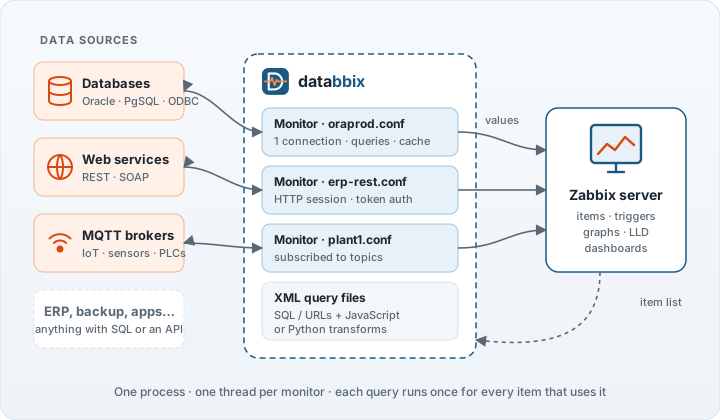
Data sources (databases, web services, MQTT) connect to Databbix monitors, which send the values to the Zabbix server.

What is it for?

Zabbix is great at watching servers and networks. But much of what matters lives inside applications: tablespaces, sessions, ERP jobs, backups, sensor readings. Databbix brings that data into Zabbix, where you already have triggers, graphs and alerts.

And it does not stop at IT: business metrics such as orders, sales, invoices or stock are just another query. If it is in a database table or behind a web service, Databbix can bring it to Zabbix.

Any SQL database

Native drivers for Oracle (including multitenant) and PostgreSQL, and ODBC for SQL Server, DB2/400 and anything else with an ODBC driver.

Web services

REST (JSON) and SOAP APIs, with login, tokens and session handling. Ideal for ERPs and appliances that only expose an API.

MQTT and IoT

Subscribes to a broker and keeps the last value of every topic. Topics are discovered automatically and turned into Zabbix items.

One query, many items

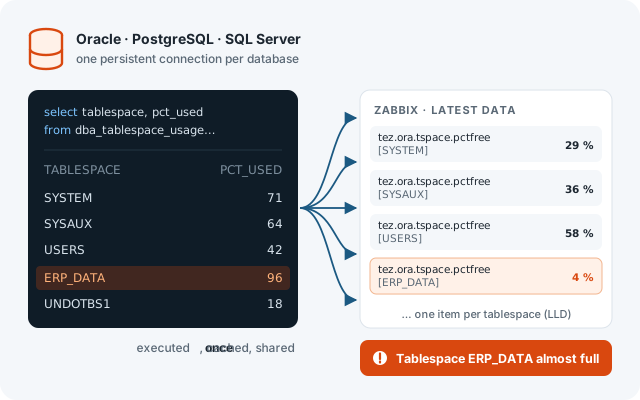
Each query runs once for every item that uses it, and the result rows are shared between them. A hundred tablespaces cost one SQL statement.

No programming

Queries are XML files: the SQL or URL, and which column or JSON path each item takes. When you need more, add a short JavaScript or Python transform.

Built for production

Persistent connections, result caching, one thread per data source and automatic retries. If one database goes down, the rest keep reporting.

Agent user parametersDatabbix
Connection to the sourceOpened and closed on every checkKept open between executions
50 items from the same table50 queries1 query, rows shared out
Result reuseNoneCache with a configurable lifetime
How checks are definedShell scripts per itemXML files, with optional scripts
Low-level discoveryWrite it yourselfBuilt in, also across databases and topics

Use cases

A few of the things Databbix is used for every day. Ready-made query files for most of them are included in the distribution.

Business metrics

Not just IT: monitor the business itself

Databbix is not limited to technical metrics. Anything that lives in a database table or can be read from a web service can become a Zabbix item: orders, sales, pending invoices, stock levels, queued shipments, response times of a business process…

  • Put business KPIs on the same dashboards as your infrastructure.
  • Use Zabbix triggers and alerts on business data: “no orders in 30 minutes” often uncovers a technical failure before anyone else notices.
  • Keep history and trends of every indicator without building a separate reporting system.
See a step-by-step example →
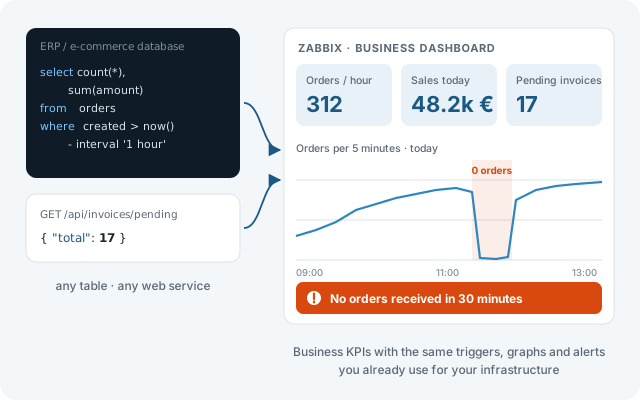
An SQL query over an orders table and a web service call feed a Zabbix dashboard with orders per hour, sales and pending invoices; a drop to zero orders raises an alert.
Databases

Watch Oracle, PostgreSQL and SQL Server from the inside

Space, sessions, locks, waits, replication, long-running jobs… anything you can express as a query becomes a Zabbix item.

  • One SQL statement feeds one item per tablespace, database or schema.
  • Discovery creates the items as objects appear, even across PDBs or databases.
  • Includes query sets for Oracle, Oracle multitenant, PostgreSQL and SQL Server.
A single SQL query about tablespaces feeds one Zabbix item per tablespace; the one that is almost full raises a problem.
Industry & IoT

Plant sensors in the same place as your IT

Connect Databbix to your MQTT broker and every topic becomes a value Zabbix can graph and alert on: temperatures, pressures, speeds, machine states.

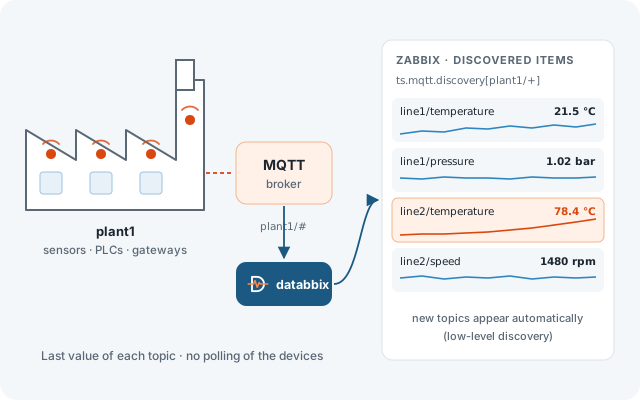
  • No polling of the devices: Databbix listens and keeps the last message.
  • Automatic discovery of topics under a pattern such as plant1/+.
  • JSON payloads can be split into fields with Zabbix preprocessing.
Factory sensors publish to an MQTT broker; Databbix subscribes and Zabbix shows the discovered topics with their graphs.
ERP & applications

Monitor business applications through their API

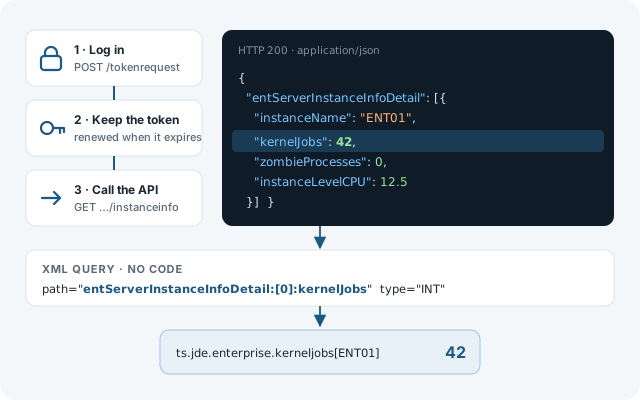
Many applications only expose their health through a web service. Databbix logs in, keeps the session alive and extracts the values you need from the response.

  • REST with JSON and SOAP, over HTTPS.
  • Authentication with basic credentials, tokens or custom login flows.
  • Includes query sets for JD Edwards (server manager and AIS).
Databbix logs into the ERP REST API, calls it and maps a field of the JSON response to a Zabbix item.
Backups

Know that every backup actually worked

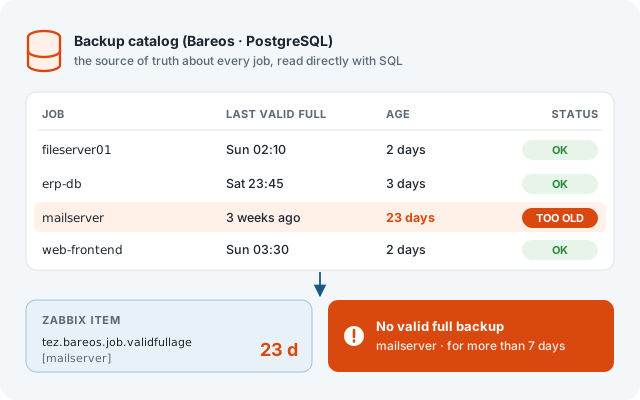
A backup job that “ran” is not the same as a valid backup. Databbix reads the backup catalog directly and tells Zabbix how old the last good copy of each job is.

  • Age, files and size of the last valid full, differential and incremental backup.
  • One item per job, discovered automatically.
  • Includes the query set for the Bareos catalog on PostgreSQL.
The Bareos catalog lists the backup jobs; one has not had a valid full backup for 23 days and Zabbix raises a problem.

How it works

Databbix behaves like a Zabbix active agent: it asks the server which items it has to collect for a host, computes them and sends the results.

  1. Create a monitorOne small .conf file per data source: the Zabbix host name, the server, and how to connect.
  2. Choose or write the queriesUse the included XML query files or write your own: SQL or URL, plus which value each item takes.
  3. Test before going liveThe queryexplorer tool loads the same configuration and lets you run any item key interactively.
  4. Add the items in ZabbixCreate items of type Zabbix agent (active) with the keys, or import the included templates.
/etc/databbix/dbs/pgprod.conf
[General]
Name             = PGPROD     # host name in Zabbix
Engine           = Database
QueryFile        = /etc/databbix/query-pg.xml

[Zabbix]
Server           = zabbix.example.com
Port             = 10051

[Data]
Module           = PG

[Database]
DBDriver         = PGsql
ConnectionString = host=pgprod dbname=postgres
UserName         = zabbix
Password         = ********

Free and open source

Databbix is free software, released under the GNU General Public License, version 2 or later. It has been developed and used in production by Trustserver since 2014. Use it, study it, improve it.