
2 Architecture and operation
2.1 One process, one thread per monitor#
Databbix runs as a single process, databbix, that serves all the data sources on the machine. Inside the process, each data source is served by its own thread, called a monitor:
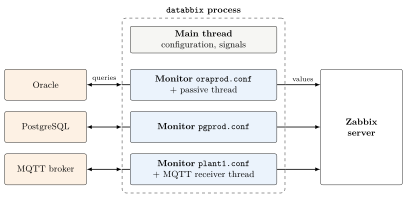
- Main thread.
-
Reads the global configuration, walks the monitor directory and starts one thread per
.conffile. It then waits: it reopens the log files when it receivesSIGHUPand tells all monitors to stop when it receivesSIGTERMorSIGINT. - Monitor thread.
-
There is one per
.conffile. Each monitor has its own connection to the data source, its own connection to Zabbix and its own log file. - Passive thread.
-
If the monitor has a non-zero
PassivePort, it starts an additional thread that listens on that port and answers Zabbix passive checks. - Engine threads.
-
Some engines need threads of their own. The MQTT engine, for example, has a thread that continuously receives the messages from the broker.
Monitors are independent of each other:
If a data source fails or is down, only its monitor is affected. The rest keep working.
If a monitor cannot start (for example, because of an error in its
.confor in an XML file), that monitor ends and logs the error, but the process keeps serving the others. The monitor is not restarted until the service is restarted.A monitor also ends if it exceeds
MaxErrorsconsecutive failed executions.When all monitors have ended, the process ends.
Warning. Since a failing monitor does not stop the process, systemctl status may report the service as active even if some monitors are not running. To watch for this, use the passive item agent.ping or check in Zabbix that data arrives from every host.
2.2 Configuration files#
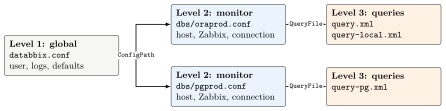
The configuration is split into three levels:
| File | Format | Contents |
|---|---|---|
databbix.conf (one) |
INI | Process configuration: daemon user and group, monitor directory, modules, and defaults for logs, query files and environment variables for all monitors. |
dbs/*.conf (one per monitor) |
INI | Everything specific to a data source: Zabbix host name, Zabbix server, engine, connection data (driver, connection string, user, URL, authentication…), query files and its own environment variables. |
query*.xml |
XML | Which data is obtained and how: SQL queries or service calls, the Zabbix items each one produces, contexts, scripts and authentications. They contain no connection data, so the same XML file serves every source of the same kind. |
tnsnames.ora, odbc.ini |
native | Definition of the Oracle and ODBC connections referred to by the monitor files. |
/etc/sysconfig/ databbix |
shell variables | Service environment (TNS_ADMIN, ODBCINI…). |
AuthPersistFile (optional) |
JSON | State of a web service authentication (for example, the token), so that it does not have to authenticate again after a restart. Written by Databbix. |
2.2.1 Value inheritance#
Some parameters can be set at the first two levels. In that case, the value in the monitor file takes precedence over the one in databbix.conf:
Parameters in the
[Log]section are inherited one by one. A monitor can, for example, raise only itsLogLevel.QueryFile: if the monitor defines any, its list completely replaces the global one.Environment: the monitor sees both the global variables and its own. If a variable is defined in both places, the monitor’s value wins. Both take precedence over the XML defaults.
2.3 Monitor life cycle#
On startup, each monitor does the following:
Reads its
.conffile and checks that the mandatory parameters are present.Loads the query collection from its XML files. If there is a syntax error, the monitor ends.
Connects to the data source. If it cannot, it retries later.
Asks the Zabbix server for the list of active items of the host (active checks).
If configured, starts the passive thread.
It then enters a loop. On each iteration it picks the first applicable task and sleeps until it is due:
If it does not have the item list yet, it requests it from Zabbix.
If there is no connection to the data source, it reconnects.
If some values could not be sent because of a Zabbix failure, it resends them.
If the item list is due for a refresh (every
Zabbix.Refreshseconds), it requests it again.Otherwise, it runs the queries of the items whose interval has elapsed and sends the results.
When the connection to the source or to Zabbix fails, the monitor waits for General.RetryOnError seconds and then retries. If the connection to Zabbix is lost, the collected values are kept and sent when the connection comes back.